
Undo and history
Every save in the Bulk Editor is kept, with who saved it and what changed, and any of the last 500 can be undone.
Note
This is part of Gridline Pro.
Each time you click Save changes in the Bulk Editor, Gridline Pro keeps a record of the save: who made it, when, and the old and new value of every cell it changed. Any of the last 500 saves can be undone.
Undo the save you just made
After a save, the green notice at the top ends with Undo. Click it to put back everything that save changed.
The history
Click History next to the Bulk Editor's title. The window lists saves, newest first, 20 at a time:
- When the save was made,
- By whom,
- Changes: how many cells on how many products, and which fields.
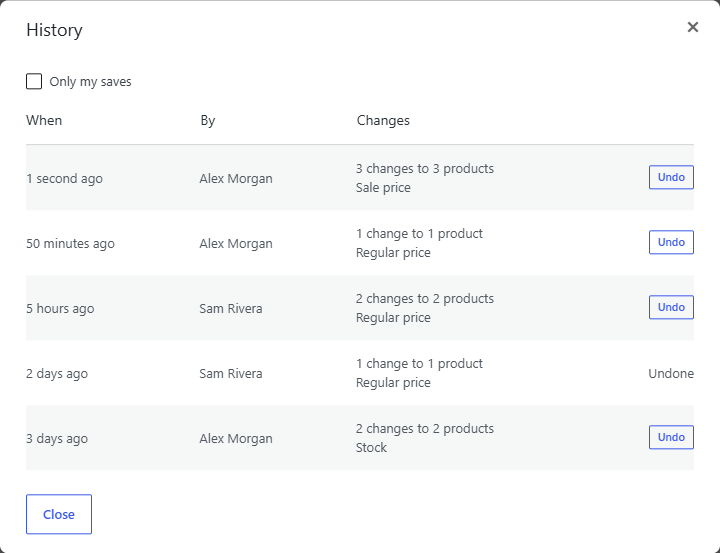
Tick Only my saves to hide everyone else's. Use Older and Newer to page through.
Click Undo on a save to put its old values back. The grid reloads to show them, and the save is marked Undone; a save can be undone once.
What undo puts back
Undo restores each cell the save changed to the value it had before, if the cell still holds the value that save gave it. A cell that was changed again since, in the grid or on the product screen, is left as it is, so undoing an old save never wipes out newer work. The notice says how many changes were put back and how many cells were left alone.
Undo saves through WooCommerce too, with the same checks as any save. An undo isn't a save of its own in the history.
What isn't in the history
- Changes made outside the Bulk Editor: on the product screen, by an import, or by another plugin.
- Adding and duplicating products. Move unwanted ones to the trash from Products instead.
- Saves older than the last 500.
Developers can change how many saves are kept with the gridline_history_size filter:
add_filter( 'gridline_history_size', function () {
	return 2000;
} );
While Gridline Pro isn't active
The history stays in your database, and appears in History again as soon as Gridline Pro is active, ready to undo.