
How table rates work
Rules are checked from the top and the first that matches sets the rate; no match means the method isn't offered.
A Table rate method prices shipping from its table of rules. Each row is a rule: when it applies, and what it costs.
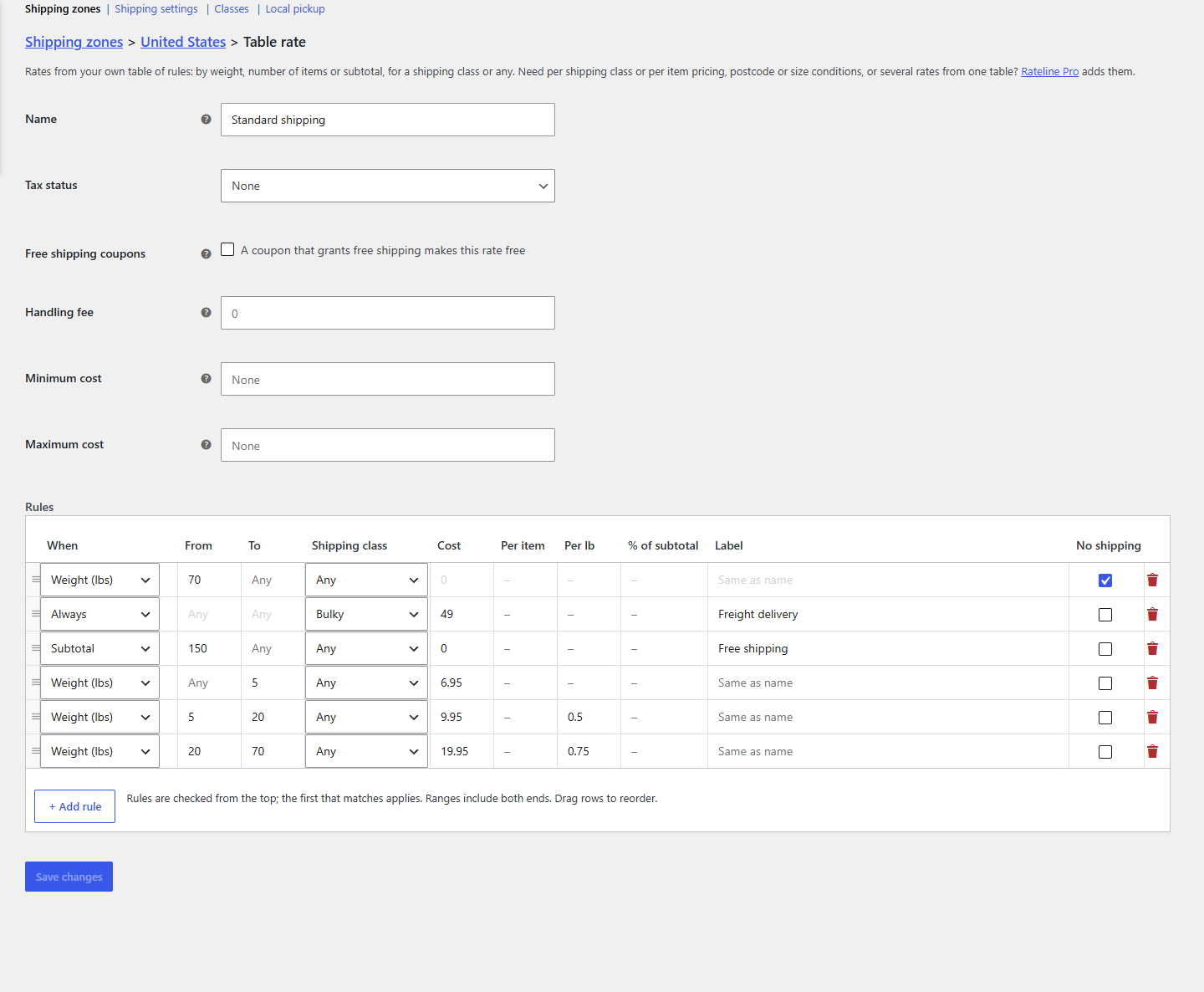
The first rule that matches applies
When a customer's cart needs a shipping price, Rateline goes down the table from the top and stops at the first rule that matches the whole order. That rule's cost is the rate. Rules further down aren't looked at.
So put specific rules first and general ones last:
- "No shipping over 70 lbs"
- "Bulky items: freight $49"
- "Free shipping over $150"
- Weight bands for everything else
- A last "Always" rule as a catch-all, if you want one
Drag a row by its handle on the left to move it. The order is saved when you click Save changes.
When a rule matches
A rule matches when both are true:
- Its condition: the order's weight, number of items or subtotal is between From and To. Both ends are included, so with bands 0–5 and 5–20 a 5 lb order uses the first one. Leave From or To empty for no lower or upper limit. Always has no range.
- Its shipping class: Any, No shipping class (the order has an item without a class), or one of your classes (the order has an item of that class).
See Conditions and shipping classes.
What the rule does
- Usually, it sets the price: a base Cost plus optional amounts per item, per weight unit and a percentage of the subtotal. See Costs.
- With a Label, the rate shows that name at checkout instead of the method's, for example "Free shipping" or "Freight delivery".
- With No shipping ticked, the method isn't offered at all for that order.
When no rule matches
The method isn't offered for that order: customers can't choose it at checkout. If it's the only method in the zone, they see WooCommerce's "no shipping options" message.
That's useful on purpose (a heavy order shouldn't ship at a parcel price), but easy to hit by accident, for example with a gap between two bands. To always offer the method, end the table with an Always rule.
After the rule
The method's own settings then apply to the cost: the handling fee, minimum and maximum cost, and free shipping coupons. See Handling fee, minimum and maximum.