
Bin locations and pick lists
Give products a bin location, then print one pick list for a whole batch, sorted for a single walk through your shelves.
Note
This is part of Packboard Pro.
A pick list is what the picker carries: everything a batch of orders needs, combined, in the order the shelves come. One walk instead of one trip per order.
Bin locations
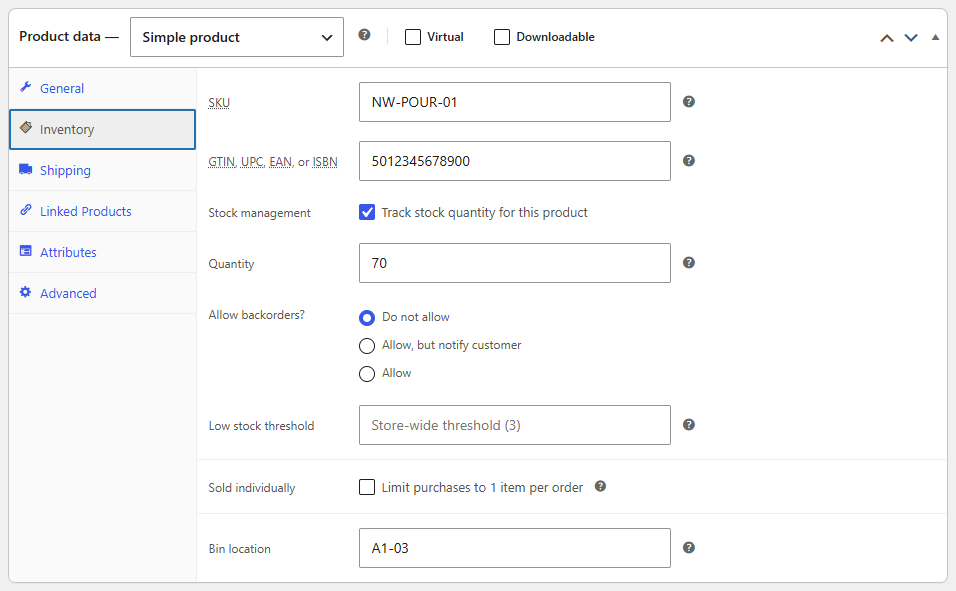
A bin location is where a product lives in your stockroom: a shelf, a box, an aisle. Use any code that sorts the way you walk, for example A1-03 for aisle A, shelf 1, position 3.
- Edit the product and open the Inventory tab of the Product data box.
- Type the code in Bin location.
- Update the product.
Variations use their product's bin, so a T-shirt in five sizes needs one bin on the T-shirt.
Tip
Codes are sorted as text, so pad numbers to the same width: A2-05 sorts before A2-10, but A2-5 would come after it.
Printing a pick list
- On the board: select orders in To pick and click Start picking. The pick list for the batch opens in a new tab and the orders move to Picking in one go. To print it again later, select them in Picking and click Pick list.
- On the order grid: select any orders and click Pick list.
Click Print at the top of the list, or use your browser's print command. If nothing opens, allow pop-ups for your store's admin.
Reading a pick list
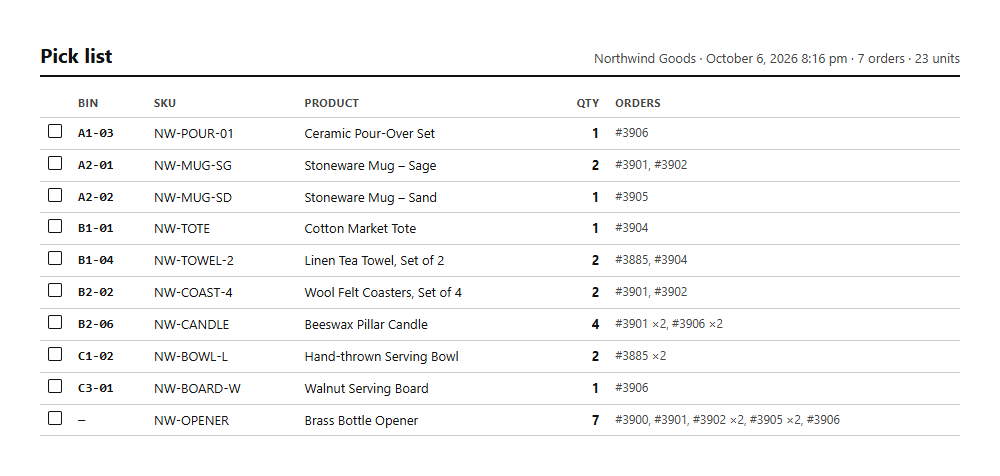
The heading shows your store, the date and time, and how many orders and units the batch has. Then one line per product (or variation):
| Column | What it is |
|---|---|
| ☐ | A box to tick when it's in the basket. |
| Bin | Where to find it, or — when the product has no bin. |
| SKU and Product | What to pick. |
| Qty | How many in total, for the whole batch. |
| Orders | Which orders need it, and how many when it's more than one: #1042 ×2, #1045. |
Lines are sorted by bin, then by SKU. Products without a bin come last, so the picker finishes the known route first.
Quantities are what's still to ship: refunded items are left out. The pick list doesn't change the orders or the stock; it's a list to work from.
Then pack
Take the basket to the packing bench, then pack each order with its packing slip, or check every item with a scanner at the pack station; see The pack station.