
Installing Stockline Pro
Upload the Stockline Pro zip, activate it next to Stockline, and enter your license key.
Note
This is part of Stockline Pro.
Stockline Pro is an add-on: it adds per-product and per-variation messages to Stockline, which stays installed and keeps doing everything else. You need both.
Before you start
- WooCommerce and Stockline 1.0.0 or later, installed and active. If you don't have Stockline yet, install it from Plugins → Add New Plugin (search for "Stockline"); see Installation.
- The stockline-pro.zip file and the license key from your purchase email. Both are in the email Lemon Squeezy sent after you bought Stockline Pro.
Install and activate
- Go to Plugins → Add New Plugin and click Upload Plugin at the top.
- Choose
stockline-pro.zipand click Install Now. - Click Activate Plugin.
WordPress won't activate Stockline Pro while Stockline or WooCommerce is inactive; it lists what's missing instead. Activate those first.
Enter your license key
Back on the Plugins screen, there's a box under Stockline Pro:
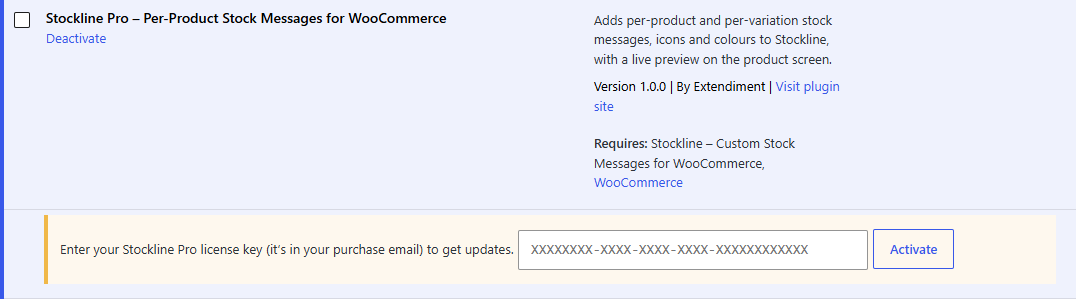
- Paste the license key from your purchase email.
- Click Activate.
The box turns green and shows the end of your key and, for a yearly license, the date your updates run until. The key activates Stockline Pro on this site only; see Licenses and updates for moving it to another site.
Note
The product features work as soon as the plugin is active, with or without a license. The license is what lets WordPress download updates.
Check it works
Edit any product and open its Inventory tab. Below the stock settings there's a message field for each stock state (Out of stock, Backorder, In stock and Low stock), each with an eye button. See Per-product and per-variation messages.
While Stockline Pro isn't active
Per-product messages stay saved on your products. Stockline shows the store-wide messages instead, and as soon as Stockline Pro is active again, every product's own messages, icons and colours are back, with nothing to re-enter.